
Skip to content
FactorFox

Mobile factoring appYour app, on their home screen. No app store between you.

Your clients install your factoring app from your own address, under your name and colors. They snap an invoice, request funding and ask Fox where their money is. Your team approves from wherever they are.

One app for every client, always current, with nothing to download from a store and nothing for you to publish.

The client app

Your app, on their home screen. No app store between you.

Your clients install your app from your own address, under your name and colors. There is no store listing to manage and no update to chase, because every client is on the current version the next time they open it. Fox is inside, under the name you give it, and answers only what each person is allowed to see.

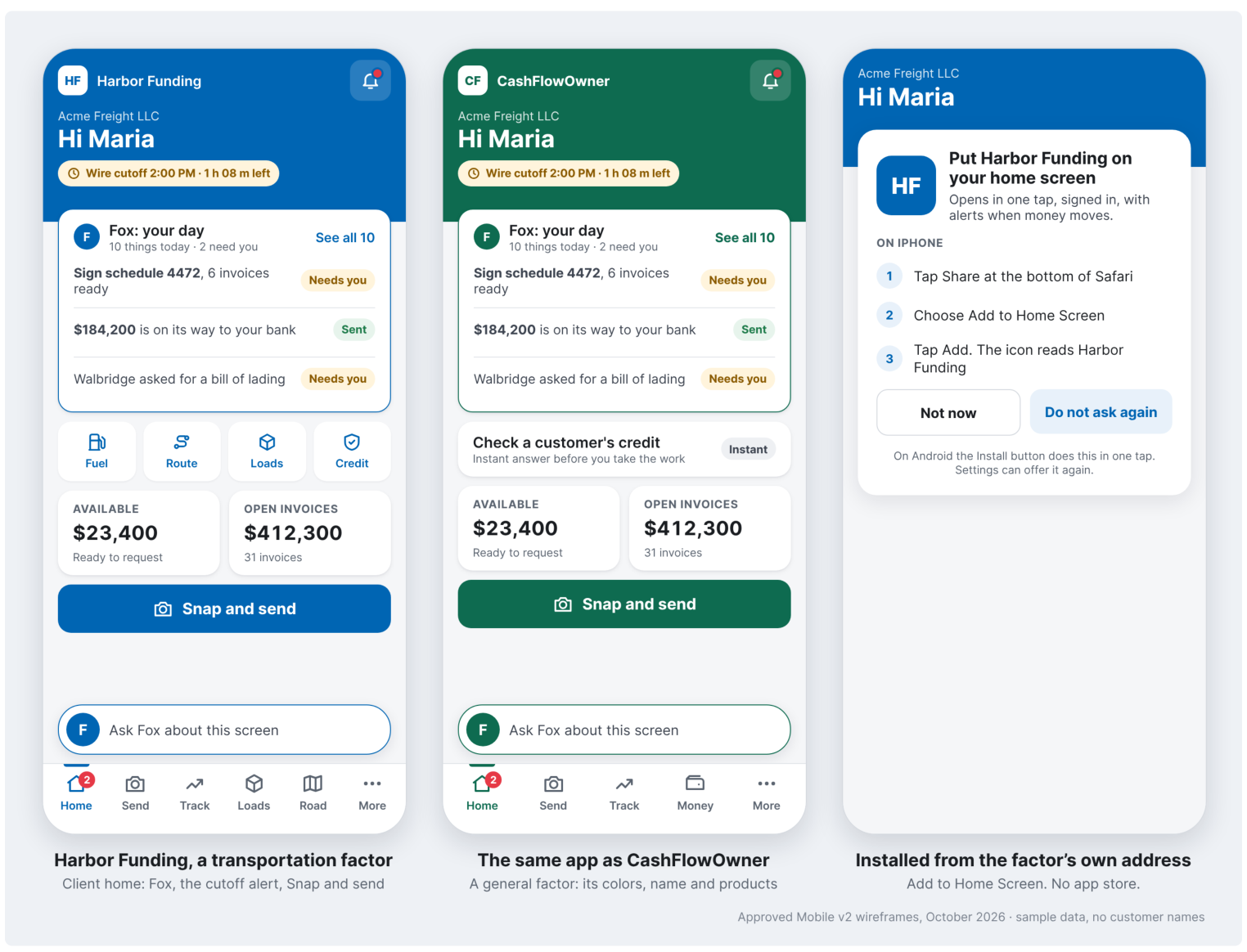
The FactorFox client app in two factors' brands: Harbor Funding, a transportation factor, in blue, and CashFlowOwner, a general factor, in green, plus the screen that installs the app from the factor's own address with no app store.
Design screens with sample data. Company names are fictional.

The same app in two factors’ colors is the whole white label argument in one look. A transportation factor and a general factor run the same product, and each client sees only its own factor’s name.

Whose brand the client sees

Browser portal
The factor's, inside a browser tab.
Vendor app in the app store
The software vendor's, in the store and on the home screen.
FactorFox client app
The factor's: its name, colors, logo and its own name for Fox.
Where it lives

Browser portal
A bookmarked web address.
Vendor app in the app store
A store listing the vendor controls.
FactorFox client app
The factor's own address, such as app.yourfactor.com, installed to the home screen.

How it updates

Browser portal
On reload.
Vendor app in the app store
When each client accepts a store update.
FactorFox client app
Every client is on the current version the next time they open it.

Setup for the factor

Browser portal
Configure the portal.
Vendor app in the app store
Ask the vendor.
FactorFox client app
Type your website address. FactorFox builds the brand from it.

What the phone adds

Browser portal
Little.
Vendor app in the app store
Notifications, and maybe a camera.
FactorFox client app
Camera capture into the same document ingestion, cutoff alerts, and Fox answering by role.

Two apps, one record

The client sends, tracks and gets paid. The factor decides.

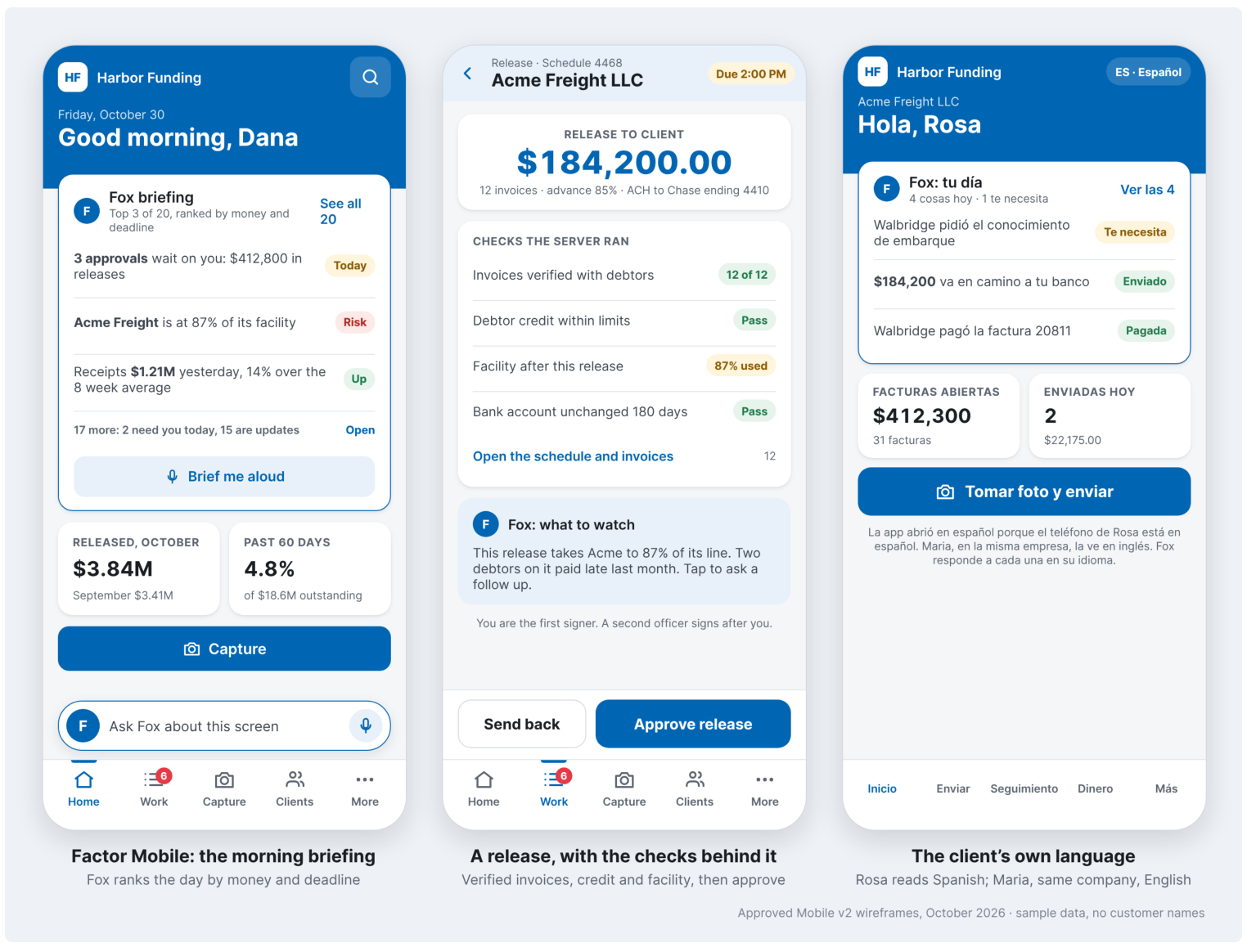
Client Mobile puts capture, funding requests and Fox in your client's hand, with every document checked by the same ingestion the platform uses. Factor Mobile puts your briefing, your releases and the checks behind them in yours. The factor sets permissions for its staff and its clients, each client sets them for its own staff, and every screen loads in the person's own language.

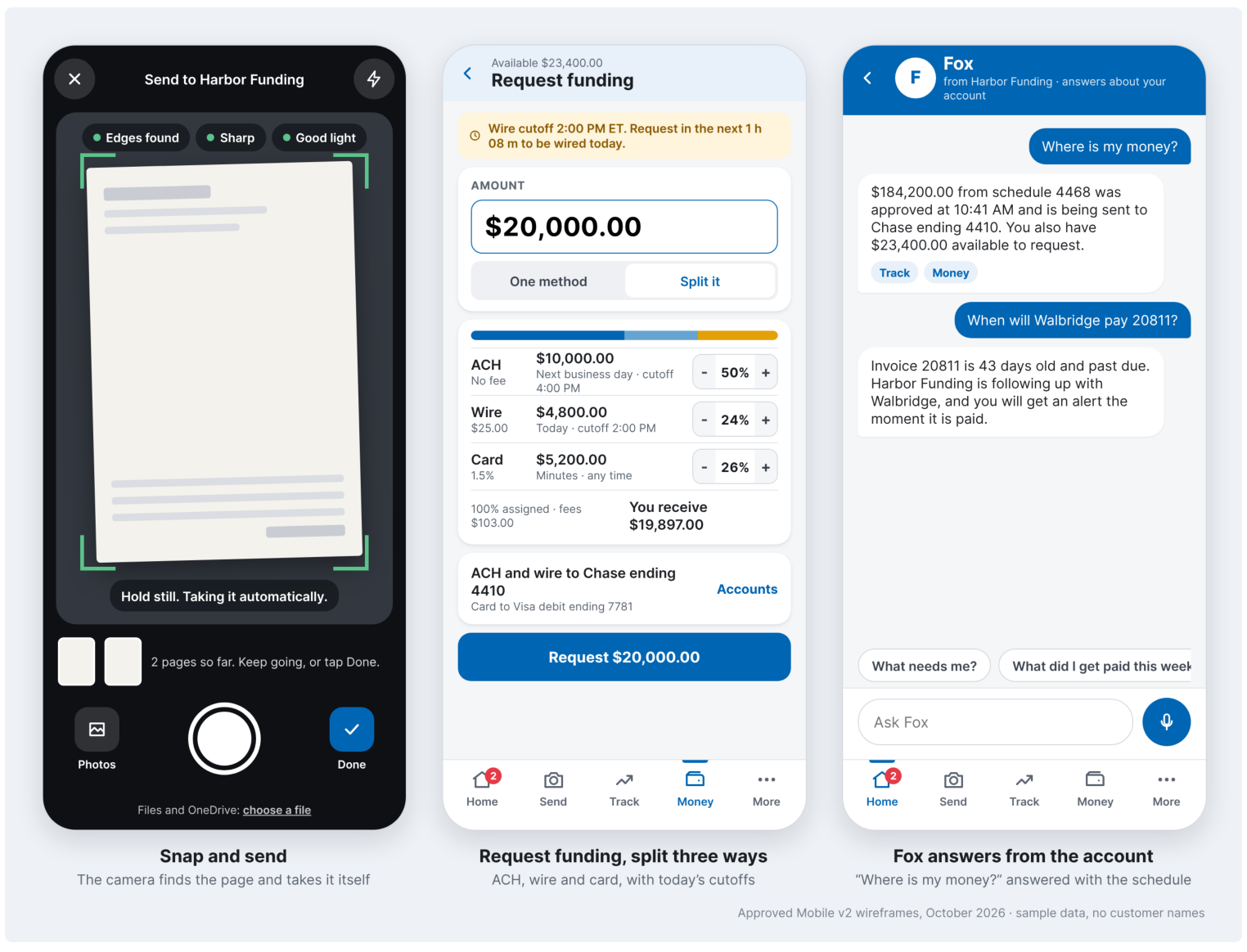
Client app screens: Snap and send, where the camera finds the page and takes it; Request funding split across ACH, wire and card with the day's cutoffs; and Fox answering where is my money from the account.
Design screens with sample data. Company names are fictional.
Factor Mobile screens: the morning briefing ranked by money and deadline, a release with the checks the server ran before approval, and the client app opening in Spanish for a Spanish speaking client.
Design screens with sample data. Company names are fictional.

The app a client opens every week carries your name, not the software vendor’s. That relationship is what a factor protects, and a store app hands it to the vendor.

Why factors choose it

The app your client opens every week should carry your name.

Snap and send

The camera finds the page and takes it, and every document goes through the same ingestion and checks as the platform.

Funding with cutoffs in view

Clients request funding by ACH, wire or card and see the day's cutoffs before they ask, so fewer requests miss the window.

Fox in your client's hand

Where is my money, what is outstanding, what is missing. Fox answers under the name you choose, within each person's permissions.

Your brand, your address

Installed from your own web address with your name, colors and logo. No store listing carries the software vendor's name.

Always the current version

Every client is on the latest release the next time they open the app. No store updates to chase.

Approvals on the go

Factor Mobile puts the briefing, releases and the checks behind them in your hand.

Straight answers

What factors ask about the mobile app

Do our clients download the app from the App Store or Google Play?

No. They install it from your own web address straight to the home screen, on iPhone or Android, under your name, colors and logo. There is no store listing to manage and no update to chase. Every client is on the current version the next time they open it.

What can a client do in the app?

Photograph invoices and supporting paper so they go through the same document checks as the platform, request funding by ACH, wire or card with the day's cutoffs in front of them, follow every schedule, and ask Fox where their money is. Fox answers only what that person is allowed to see.

What does our own team get?

Factor Mobile puts your briefing, the day's releases and the checks behind each one in your hand, so an approval does not wait for someone to get back to a desk.

Does the app carry our brand or FactorFox's?

Yours. The client sees your name, your colors, your logo and the name you give Fox. The relationship your client opens every week is with you, not with the software vendor.

Does it work in Spanish and other languages?

Yes. Every screen opens in the language each person chose, so a Spanish speaking client and an English speaking credit officer work on the same record in their own languages.

What does it take to set up?

Type your website address. FactorFox builds the brand from it, and the app is served from your own address.

See your clients' app in your colors.

Give us your website address and we will show you the app your clients would install, branded as yours.